Learning event
Acquisition
Discovery
Dialogue
Practice
Creation
Learner action
Element
Pedagogy
TECHNOLOGY FOR TEACHING AND LEARNING 2 | STUDENT MODULE
Read, watch, listen, or attend to ar
explanation or demonstration.
Search, inspect, compare, investigate,
and make sense of information.
Design, produce, synthesize
document. and communicate an
output.
Three elements of meaningful integration
Possible technology function
Discuss, question, explain, negotiate, Support shared comments,
eritique, and collaborate.
conferencing, or recorded feedback
Provide organized content, captions, replay.
Z0om, and examples
Provide access to sources, simulations, data,
images, or annotated evidence
Rehearse, apply, test, receive Provide guided tasks, simulation, repeated
feedback, and improve.
attempts, checklist, and timely feedback
Support authoring, editing,
nublishing. and presentation
forums,
A useful way to examine ICT integration is to consider three connected elements: pedagogy, social interaction, and
technology. Pedagogy identifies the learning purpose and sequence. Social interaction makes thinking visible through
teacher-learner, learner-learner, or learner–community exchange. Technology supports access, representation,
investigation, practice, collaboration, creation, or feedback. Weakness in any element can reduce learning.
Questions for the learner or teacher
prototyping,
What is the outcome? What learning event is needed? What prior knowledge,
scaffold, feedback, and assessment will support it?
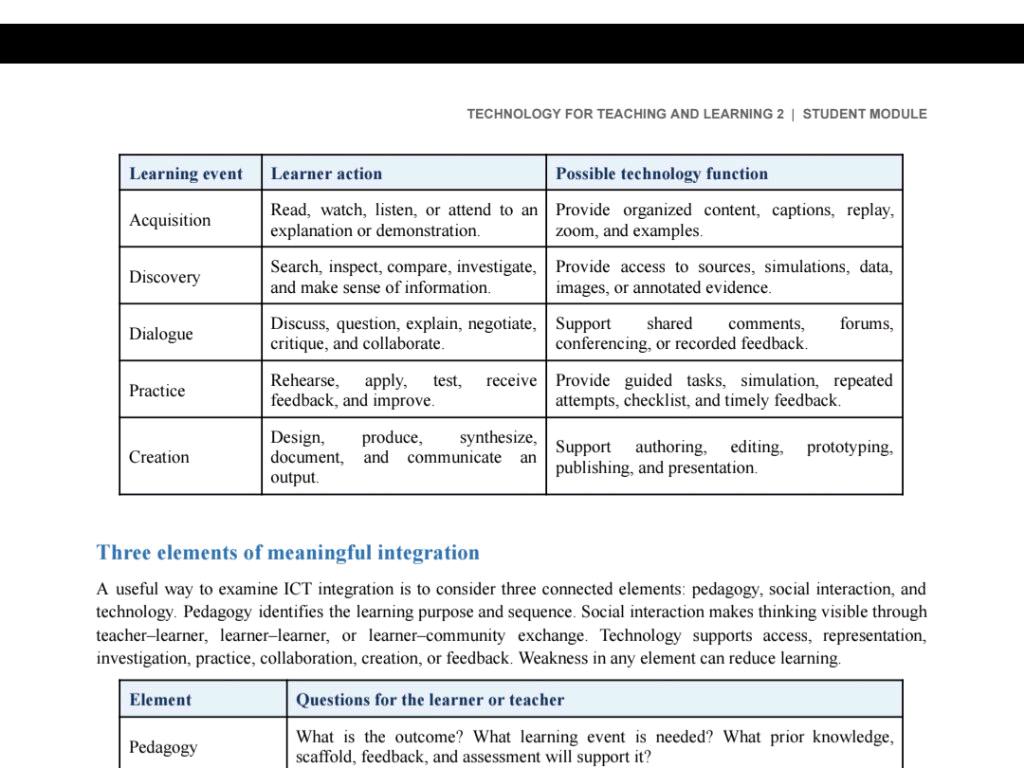
Learning Events and ICT Integration Framework
Key Takeaways
- Learning events categorize instructional activities into five key types: Acquisition, Discovery, Dialogue, Practice, and Creation.
- Meaningful ICT integration requires the alignment of three core pillars: Pedagogy, Social Interaction, and Technology.
- Technology functions effectively only when it directly supports specific learner actions rather than serving as a passive substitution.
Learning events in educational technology define the instructional interactions where learners engage with content through distinct cognitive actions—such as acquiring, discovering, conversing, practicing, or creating—supported by targeted digital tools to achieve specific learning outcomes.
Table of Contents
- Classification of Learning Events and Technology Roles
- The Three Elements of Meaningful ICT Integration
- Instructional Design Questions for Educators
- Summary Table
Classification of Learning Events and Technology Roles
Educational frameworks (such as Diana Laurillard’s Conversational Framework) categorize the learning process into distinct event types, each demanding specific learner behaviors and technological affordances:
-
1. Acquisition (Learning through listening, reading, and watching)
- Learner Action: Read, watch, listen, or attend to an explanation or demonstration.
- Technology Role: Delivers structured multimedia, closed captions, variable playback speeds, zoom controls, and interactive demonstration models.
- Examples: Digital textbooks, recorded mini-lectures, instructional video platforms.
-
2. Discovery (Learning through inquiry and exploration)
- Learner Action: Search, inspect, compare, investigate, and make sense of information.
- Technology Role: Grants access to raw datasets, virtual simulations, digital archives, case studies, and annotated primary sources.
- Examples: Virtual lab simulators, academic search engines, web-based inquiry modules.
-
3. Dialogue (Learning through discussion and negotiation)
- Learner Action: Discuss, question, explain, negotiate, critique, and collaborate.
- Technology Role: Facilitates shared annotations, threaded forums, real-time web conferencing, and recorded audio/video feedback.
- Examples: Discussion boards, synchronous breakout rooms, collaborative document commenting.
-
4. Practice (Learning through application and feedback)
- Learner Action: Rehearse, apply, test, receive feedback, and refine performance.
- Technology Role: Provides structured interactive exercises, low-stakes drills, diagnostic self-checklists, and automated immediate feedback.
- Examples: Adaptive quiz platforms, branching scenario games, procedural skill simulators.
-
5. Creation (Learning through synthesis and production)
- Learner Action: Design, produce, synthesize, document, and present a tangible artifact.
- Technology Role: Supplies authoring tools, media editors, digital workspaces, prototyping software, and publishing channels.
- Examples: Digital poster creators, podcast production tools, video editors, website builders.
Pro Tip: Balance your lesson plans across multiple learning events. Relying solely on Acquisition leads to passive cognitive overload, whereas integrating Practice and Creation deepens concept retention.
The Three Elements of Meaningful ICT Integration
Effective integration does not treat technology as an isolated feature; rather, it balances three interdependent elements:
            ┌────────────────────────┐
            │        Pedagogy        │
            │  (Purpose & Sequence)  │
            └───────────┬────────────┘
                        │
         ┌──────────────┴──────────────┐
         ▼                             ▼
┌─────────────────┐           ┌─────────────────┐
│Social Interaction│ ◄───────► │   Technology    │
│(Visible Thinking)│           │(Digital Support)│
└─────────────────┘           └─────────────────┘
- Pedagogy: Establishes the instructional goals, sequencing, prerequisite scaffolding, and evaluation strategies.
- Social Interaction: Cultivates active dialogue between teacher-learner, learner-learner, and learner-community, making internal cognitive processes transparent.
- Technology: Serves as the cognitive amplifier providing accessibility, data manipulation, interactive scaffolding, and creative expression.
Warning: A deficiency in any single element undermines the entire instructional activity. Powerful software cannot compensate for poorly planned pedagogy or absent social feedback.
Instructional Design Questions for Educators
When planning an ICT-supported unit or lesson, evaluate these key design prompts:
- Pedagogy Focus: What specific learning outcome must students achieve? Which learning event is best suited for this cognitive stage?
- Scaffolding Focus: What prior knowledge is required, and what assistive scaffolds or rubric criteria are necessary?
- Feedback Focus: How will formative assessments guide learners during practice and production?
Summary Table
| Learning Event | Primary Learner Action | Key Technology Function | Example Tools |
|---|---|---|---|
| Acquisition | Read, watch, listen | Organize content, replay, captions | Video repositories, e-readers |
| Discovery | Search, inspect, investigate | Provide datasets, simulations | Science simulators, digital databases |
| Dialogue | Question, critique, discuss | Forums, shared comments | Discussion boards, voice feedback |
| Practice | Rehearse, test, receive feedback | Guided tasks, checklists, auto-feedback | Interactive drill apps, self-assessments |
| Creation | Design, produce, synthesize | Authoring, editing, publishing | Multi-media editors, portfolio suites |
Would you like an example of a lesson plan designed around one of these specific learning events?
Explain this answer to me clearly, step by step
Step-by-Step Breakdown of Learning Events and ICT Integration
This framework explains how teachers choose the right digital tools by focusing on what the student is doing (the learning event) rather than just picking technology for its own sake. It connects instructional goals, social communication, and digital tools into one functional system.
Table of Contents
- Step 1 — Understand What a Learning Event Is
- Step 2 — The 5 Core Learning Events Explained
- Step 3 — The Three Pillars of Meaningful Integration
- Step 4 — How to Apply the Framework in Practice
- Summary Table
Step 1 — Understand What a Learning Event Is
A learning event is any structured moment in a lesson where a specific type of learning happens.
Instead of asking “What app should I use?”, the framework forces the teacher to ask:
- What is the student doing cognitively? (Listening? Investigating? Discussing? Practicing? Creating?)
- What technology feature actually helps that action?
Technology is never the lesson itself—it is a functional support tool for the learner’s brain.
Step 2 — The 5 Core Learning Events Explained
The table outlines five progressive ways students engage with knowledge:
-
Acquisition (Absorbing Information)
- What the student does: Reads a text, listens to a lecture, or watches a demonstration.
- How technology helps: Adds playback controls (pause/rewind), closed captions, high-resolution zoom, and organized digital chapters so students can process content at their own speed.
-
Discovery (Inquiry and Investigation)
- What the student does: Searches for clues, analyzes data sets, compares sources, and draws conclusions.
- How technology helps: Provides searchable databases, digital archives, and interactive simulations where variables can be tested safely.
-
Dialogue (Social Learning and Debate)
- What the student does: Discusses, questions peers, debates ideas, and negotiates meaning.
- How technology helps: Provides communication channels such as discussion forums, video conferencing breakout rooms, and collaborative document comment threads.
-
Practice (Skill Application and Feedback)
- What the student does: Tries an exercise, makes mistakes, sees the result, and tries again to improve.
- How technology helps: Delivers automated instant feedback, branching practice tasks, checklists, and skill-building drills.
-
Creation (Building and Synthesizing)
- What the student does: Designs, writes, edits, constructs, or produces an original project or presentation.
- How technology helps: Provides creative software such as video editors, digital poster creators, slide builders, and online publishing platforms.
Step 3 — The Three Pillars of Meaningful Integration
The bottom half of the module explains that digital learning fails if you only focus on the software. You must balance three elements:
                  ┌───────────────────────────────┐
                  │           Pedagogy            │
                  │ (Goal, Sequence, Assessment)  │
                  └───────────────┬───────────────┘
                                  │
                 ┌────────────────┴────────────────┐
                 ▼                                 ▼
    ┌──────────────────────────┐      ┌──────────────────────────┐
    │    Social Interaction    │      │        Technology        │
    │(Discussion & Peer Review)│ ◄──► │ (Access & Functionality) │
    └──────────────────────────┘      └──────────────────────────┘
- 1. Pedagogy: The roadmap. It defines what learning outcome must be achieved, in what order, and how mastery will be measured.
- 2. Social Interaction: The human connection. It makes student thinking visible through dialogue between teacher and student or among peers.
- 3. Technology: The engine. It provides the digital medium, accessibility options, and interactive features needed to make the pedagogy work.
Step 4 — How to Apply the Framework in Practice
When designing or evaluating a lesson, run through these three guiding questions in order:
- Outcome First: What specific skill or concept should the student master?
- Event Selection: Which learning event (Acquisition, Discovery, Dialogue, Practice, or Creation) best builds that skill?
- Tool Alignment: What exact technological feature (replay, simulation, forum, automated feedback, or authoring tool) directly supports that event?
Summary Table
| Step / Component | Core Question | Primary Focus |
|---|---|---|
| 1. Learning Event | What is the student doing? | Cognitive activity (absorbing, exploring, debating, practicing, or building) |
| 2. Pedagogy | What is the learning goal? | Lesson design, scaffolding, prerequisites, and assessment |
| 3. Social Interaction | How is thinking shared? | Discussion, peer critique, teacher feedback, and collaboration |
| 4. Technology | What digital affordance is needed? | Tools that provide access, simulations, communication, or creation |
Would you like to walk through a concrete classroom example (such as a Science or English topic) to see how all 5 learning events look in a single unit plan?