ICT is not the 21st-century skill by itself
Using a computer does not automatically develop critical thinking or ereativity. Copying deiti
involve a device but little analysis. In contrast, comparing two safe network configuratio
receiving peer feedback, and revising a recommendation can develop technic
com
mmunication, collaboration, and digital responsibility.
Lesson 2: Foundations of ICT-pedagogy integration
Technology use is not yet integration
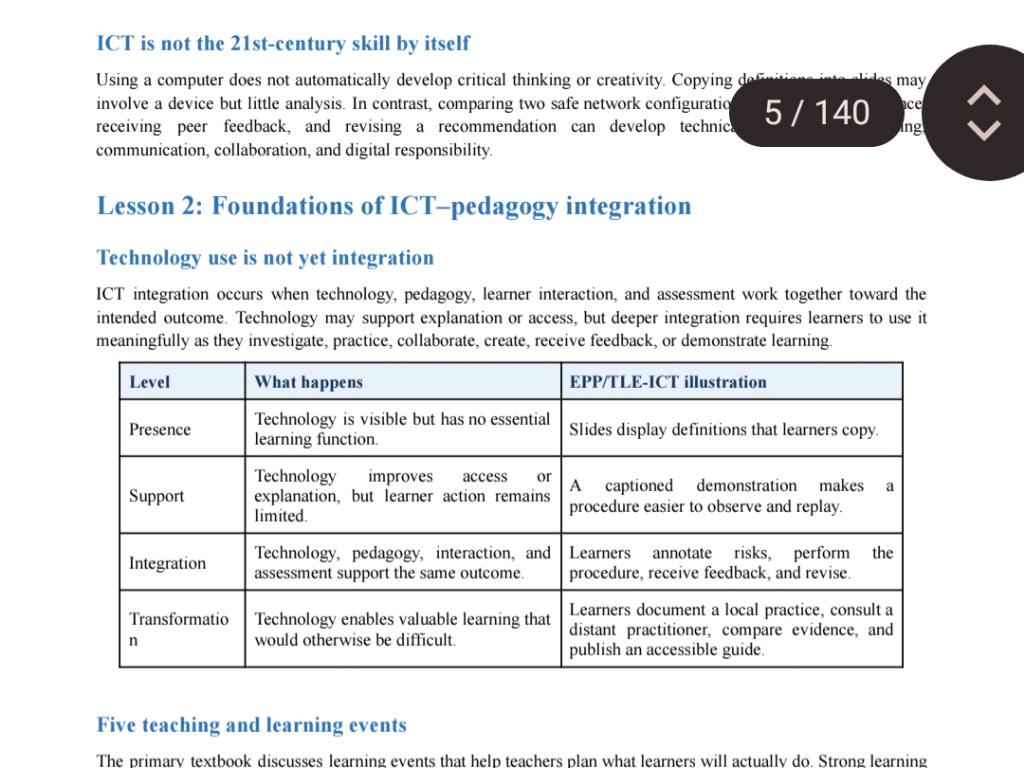
Level
ICT integration occurs when technology. pedagogy, learner interaction, and assessment work together toward the
intended outcome. Technology may support explanation or access, but deeper integration requires learners to use it
meaningfully as they investigate. practice, collaborate, create, receive feedback, or demonstrate learning.
Presence
Support
Integration
Transformatio
What happens
Technology is visible but has no essential
learning function.
Technology improves access
explanation, but learner action remains
limited.
or
5/ 140
Technology enables val uable learning that
would otherwise be difficult.
Five teaching and learning events
EPP/TLE-ICT illustration
Slides display definitions that learners copy.
Technology, pedagogy, interaction, and Learners annotate risks, perform the
assessment support the same outcome procedure, receive feedback, and revise.
captioned demonstration makes a
procedure easier to observe and replay
may
Learners document a local practice, consult a
distant practitioner, compare evidence, and
publish an accessible guide
The primary textbook discusses learning events that help teachers plan what learners will actually do Strong learning
Foundations of ICT–Pedagogy Integration and 21st-Century Skills
Key Takeaways
- Mere technology use does not equal meaningful learning; critical thinking occurs when pedagogy, learner interaction, and assessment align.
- Levels of ICT Integration progress across four distinct tiers: Presence, Support, Integration, and Transformation.
- Deeper learning requires students to actively investigate, create, collaborate, and receive feedback rather than passively consume or copy information.
ICT integration is the deliberate alignment of digital tools, pedagogy, student engagement, and assessment to achieve specific learning outcomes. Merely utilizing a computer or digital device does not build critical thinking or creativity unless students actively analyze, evaluate, solve problems, and collaborate using those technologies.
Table of Contents
- Core Principle: Technology Use vs. Pedagogy Integration
- The Four Levels of ICT Integration
- Summary Table of ICT Levels and Classroom Applications
- Frequently Asked Questions
Core Principle: Technology Use vs. Pedagogy Integration
Simply placing devices in a classroom represents technological presence, not pedagogical integration. For example, copying definitions directly from projected presentation slides into notebooks employs digital hardware, yet it demands little to no cognitive analysis from the student.
True integration happens when technology fundamentally supports active learning processes. Engaging tasks—such as evaluating conflicting network security setups, providing structured peer feedback, and revising technical solutions—foster higher-order skills such as technical reasoning, collaborative communication, and digital citizenship.
Pro Tip: When designing lesson plans, focus first on the pedagogical learning outcome, then select the digital tool that best facilitates active inquiry or problem-solving.
The Four Levels of ICT Integration
Educational frameworks categorize the progression of classroom technology adoption into four developmental stages:
-
Presence
- Mechanism: Technology is physically visible in the environment but performs no essential instructional function.
- Practical Example: Projecting text-heavy slides solely for learners to transcribe definitions into their notebooks.
-
Support
- Mechanism: Technology enhances delivery, access, or demonstration, yet the learner remains mostly a passive observer.
- Practical Example: Showing a captioned video demonstration so learners can pause, observe, and replay a technical procedure.
-
Integration
- Mechanism: Technology, teaching strategies, learner activity, and assessment methods work simultaneously toward the target objective.
- Practical Example: Learners use interactive software to annotate potential safety risks, execute a technical procedure, receive targeted peer feedback, and submit revisions.
-
Transformation
- Mechanism: Technology makes authentic, highly complex learning experiences possible that would otherwise be impractical or impossible in a traditional setting.
- Practical Example: Students document a real-world community practice, consult an expert remotely via video conferencing, synthesize empirical evidence, and publish an interactive digital guide.
Summary Table of ICT Levels and Classroom Applications
| Integration Level | Core Function of Technology | Learner Role | EPP / TLE-ICT Classroom Illustration |
|---|---|---|---|
| Presence | Minimal / decorative; no essential educational function | Passive receiver | Copying definitions displayed on slide decks |
| Support | Improves accessibility and visual explanation | Guided observer | Watching captioned video tutorials to understand steps |
| Integration | Directly aligns tools, pedagogy, and assessment | Active participant | Annotating risks, performing tasks, and revising work |
| Transformation | Enables previously inaccessible learning opportunities | Creator & collaborator | Collaborating with remote experts and publishing solutions |
Frequently Asked Questions
1. Why is ICT not considered a standalone 21st-century skill?
Digital devices are delivery mechanisms. Core 21st-century competencies—such as critical thinking, creative problem-solving, and communication—depend on how learners manipulate information and solve authentic tasks using those tools.
2. How does the Support level differ from the Integration level?
At the Support level, the teacher uses technology to enhance explanations while student action remains limited. At the Integration level, students actively use the tool to interact, complete tasks, and demonstrate mastery.
3. What role does feedback play in pedagogical ICT integration?
Digital tools facilitate rapid feedback loops (peer review, automated diagnostic checks, annotations), allowing learners to reflect, refine, and deepen their understanding iteratively.
Next Steps
Would you like an example lesson plan demonstrating how to move a specific topic from the Support level to the Transformation level?
Write an answer script for a speaking exam about this topic. Do not give suggestions, only provide the speaking answer text
Spoken Response Script: Foundations of ICT–Pedagogy Integration
Introduction and Thesis
Good morning/afternoon. Today, I would like to address a common misconception in modern education: the idea that Information and Communications Technology (ICT) is, by itself, an inherent 21st-century skill.
Simply handing a student a tablet or sitting them in front of a computer does not automatically build critical thinking, collaboration, or creativity. A device is merely a delivery medium; true educational value depends on ICT-pedagogy integration—the intentional alignment between digital tools, teaching strategies, learner activity, and assessment.
Key Argument 1: Presence vs. Active Cognitive Demand
To illustrate this distinction, consider how computers are often used in classrooms. If a student simply copies definitions from a digital slide presentation into a notebook, technology is physically present, but the level of cognitive analysis remains minimal.
In contrast, true 21st-century learning happens when students use technology to solve authentic problems. For instance, when learners evaluate two competing network security configurations, consult real-world technical documentation, exchange peer feedback, and revise their proposals, they actively develop technical reasoning, communication skills, and digital responsibility.
Key Argument 2: The Four Levels of ICT Integration
Educational frameworks explain this progression across four distinct levels:
- Presence: Technology is visible but serves no essential instructional function, such as transcribing text directly off a screen.
- Support: Technology enhances accessibility or teacher delivery—for example, playing a captioned video demonstration so learners can pause and replay complex procedures—though student interaction remains limited.
- Integration: Technology, pedagogy, and assessment work together toward a shared objective. Here, students use digital tools to annotate safety risks, carry out tasks, and refine their work based on feedback.
- Transformation: Technology makes high-impact learning possible that could not otherwise occur. For example, students can document a local community practice, interview remote experts via video conferencing, and publish an accessible digital guide for a global audience.
Conclusion
In conclusion, technology does not replace sound teaching; it amplifies it. For schools to cultivate genuine 21st-century competencies, educators must move beyond mere technology presence and strive for integration and transformation, ensuring that pedagogy always drives the tool, rather than the other way around.
Next Steps
Would you like me to adapt this speaking script into a 1-minute condensed version or prepare potential follow-up questions an examiner might ask?